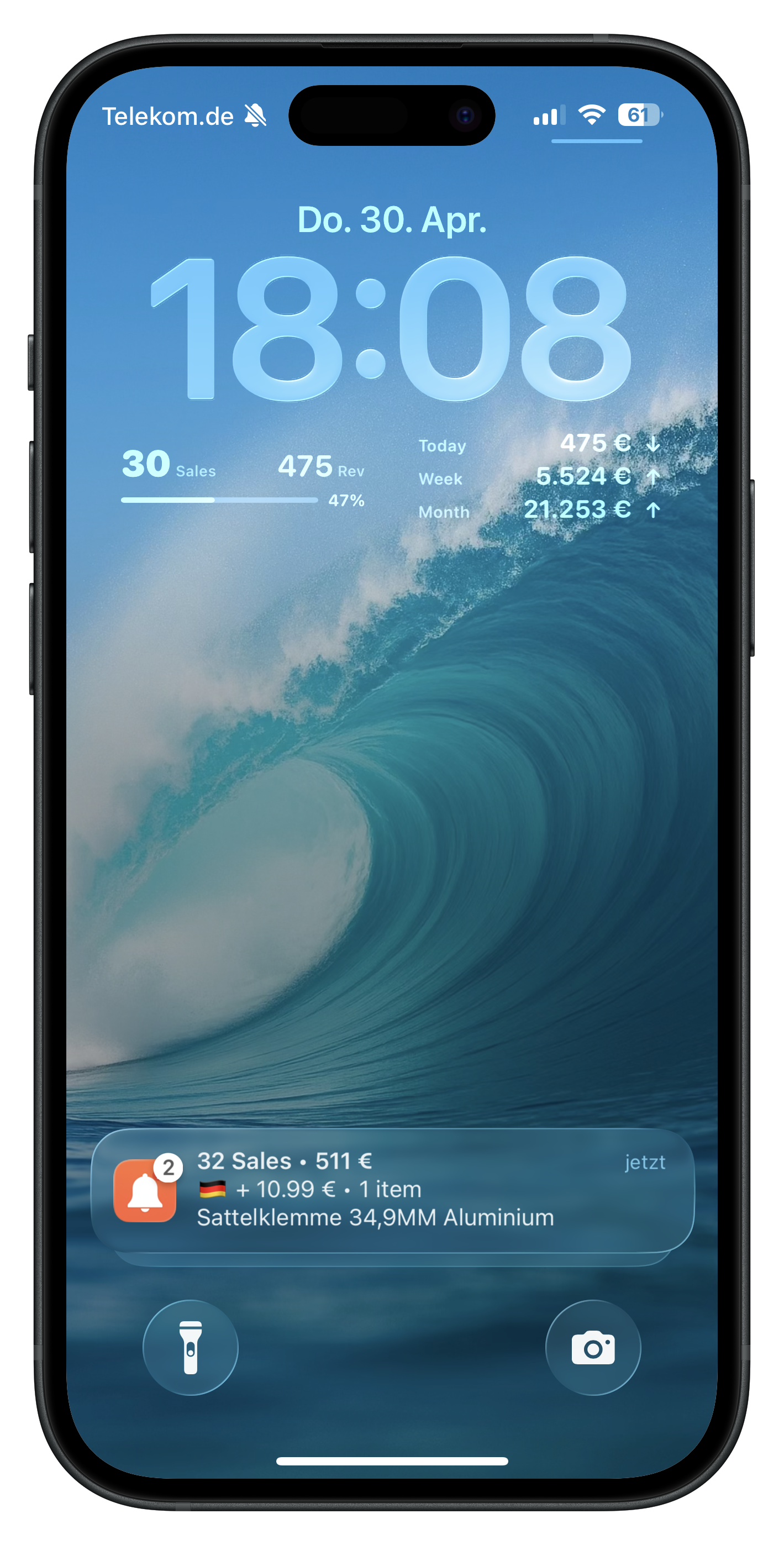
iPhone Lock Screen with GetNotified Amazon sale notification

The instant ka-ching for every Amazon sale.

Stop refreshing Seller Central. GetNotified pushes every order, BSR change and BuyBox loss straight to your phone — across all marketplaces, all accounts.

100% free Setup in 2 min All marketplaces
All notification types

Every alert an Amazon seller actually needs.

From the first sale of the day to a lost BuyBox at 3 AM — GetNotified covers the events that move your business, with full per-marketplace control.

Sales & Orders

🔔

Instant Sale Alerts

Hear the famous "ka-ching" the second an order hits any of your Amazon accounts — even when the phone is silenced.

🌍

Multi-Marketplace

Europe, North America and Far East — every marketplace consolidated into one feed with auto currency conversion.

🔒

Privacy Mode

Hide revenue figures inside notifications when you're presenting or in public — counters still update silently in the background.

Highlights

🏆

Records

Pop-ups when you break a 30-day or all-time revenue record. The good kind of dopamine.

🎯

Milestones

Celebrate the 100th order, the $10K week, the first sale on a new ASIN — all detected automatically.

🐋

Whales

An unusually large order just landed. You'll know before the warehouse does.

Daily Updates

📖

Daily Recap

Every morning at 8 AM: yesterday's sales, revenue, and how it stacks up against the typical day of the week.

Daily Goal Hit

Set a revenue target and we ping you the moment you cross it — region by region.

Anomaly Detection

🛡️

BuyBox Lost

Real-time alert when you lose the BuyBox on one of your ASINs — with the offending offer and a tap-to-Amazon link.

👤➕

New Competitor

Someone just listed against your ASIN. You decide whether to fight, lower price or take notes.

📈

Strong Pacing

Your day is trending 30 %+ above a typical day-of-week. Restock conversations start here.

📉

Sales Drop

50 %+ drop versus your typical pace? GetNotified flags it before you find out from a panicked Slack message.

🥇

Bestseller Badge

Win — or lose — the #1 Bestseller badge in a subcategory. Tap the alert to land directly on the Amazon page.

Beyond notifications

One dashboard. Every marketplace.

GetNotified isn't just a push tool — it's a real-time view of your Amazon business.
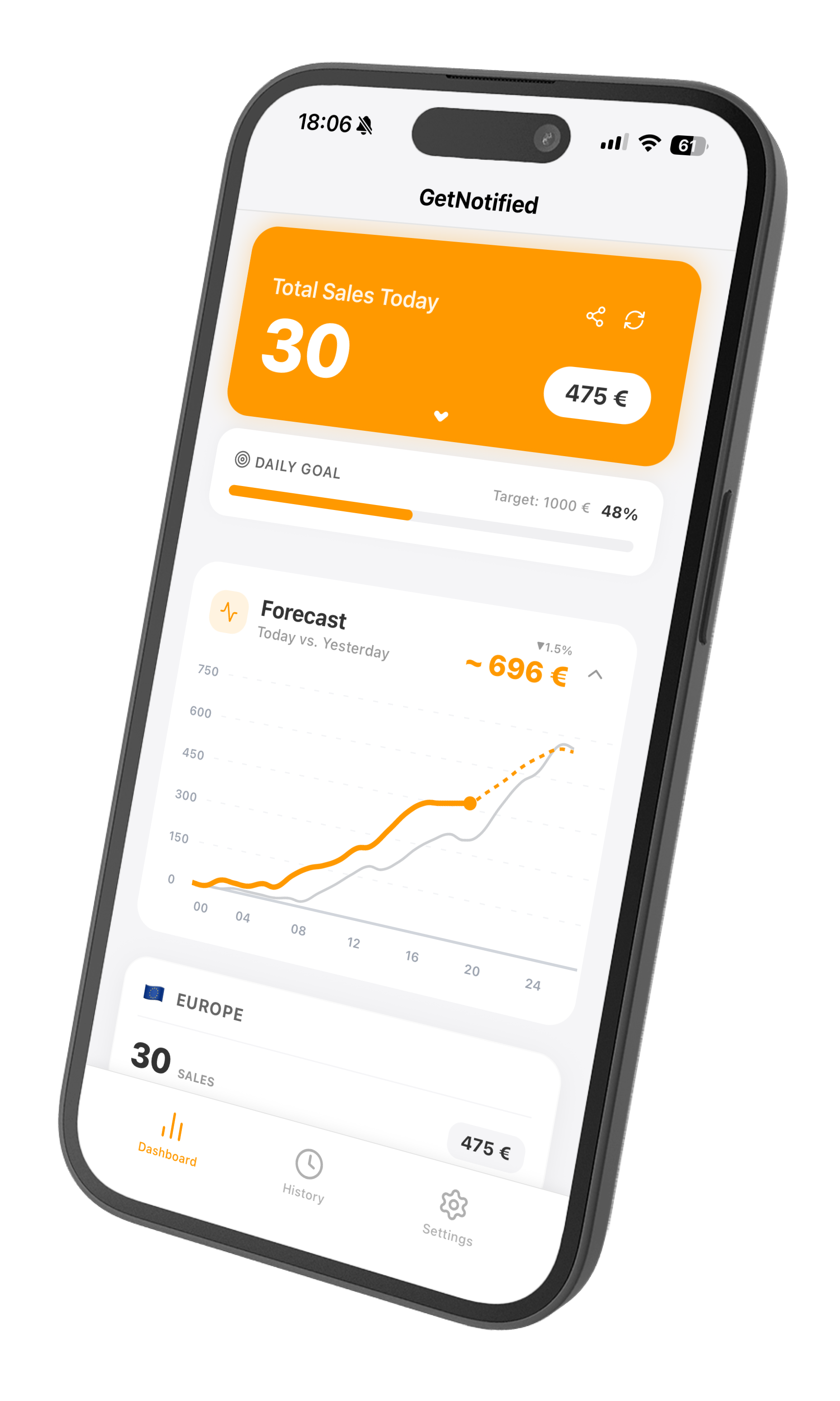
  • Global sales counterToday / week / month, currency-converted into your preferred currency.
  • Live Pacing ChartSee how today is shaping up versus the rolling average for the same weekday.
  • iOS Home-Screen WidgetsToday / Week / Month totals on your Lock Screen and Home Screen.
  • Apple Watch syncSales tick across to your wrist — silent, glanceable, instant.
  • Product ManagerTracked ASINs grouped by parent. Edit titles, hide variations, or remove what you don't care about.
  • Customizable LayoutReorder cards or hide ones you don't use. Sales and Daily Goal stay pinned at the top.
GetNotified dashboard preview
How it works

Live in two minutes.

No SDK install, no script tag, no monthly fee. GetNotified uses Amazon's official SP-API and OAuth.

Install & sign in

Download for iOS, Android or Chrome. Sign in with email — no password gymnastics.

Connect Seller Central

One-tap OAuth into your Amazon seller account. We never see your password — only secure SP-API tokens.

Hear that ka-ching

Configure thresholds, sounds and which alert types you want. Then go back to building products.

Pricing

Free. For real.

Every notification type, every marketplace, widgets, dashboard, Chrome extension. No credit card, no trial countdown, no upsell wall.

$0

Forever — for every Amazon professional seller.

From the blog

Sharper sellers read this.

FAQ

Questions sellers actually ask.

Is GetNotified really free?
Yes. Every feature listed on this page is free for every Amazon professional seller — no trial, no credit card, no Pro tier. The app is funded by aggregated, anonymized market-trend data (you can opt out in settings).
Which marketplaces are supported?
All major Amazon marketplaces across Europe, North America and the Far East. You can mute alerts on a per-marketplace basis — useful if e.g. you only want BuyBox alerts on .com but not on smaller markets.
How does it connect to my Seller Central account?
Through Amazon's official SP-API using OAuth. We never see or store your Amazon password. You can revoke access from Seller Central at any time.
Will the ka-ching sound work in Silent Mode?
Yes. The notification sound plays even when your phone is on Silent — it uses the iOS critical-style sound channel. You can change the sound or mute it entirely in Settings.
What's the threshold setting?
It controls how many sales must accumulate before you get pushed. Set it to 1 and every order pings you. Set it to 5 if you only want to hear about busier bursts. Adjustable per device.
Does the Chrome extension need a separate account?
No. Sign in once on the mobile app — the extension auto-syncs. The browser just needs to be open for desktop notifications to fire.
Can I turn off specific alert types?
Every alert type — Records, Whales, BuyBox Lost, BSR Badge, Daily Recap, Sales Drop, etc. — is individually toggleable. BuyBox, New Competitor and BSR alerts also support per-marketplace opt-out.
How is my data handled?
Sales and revenue figures are pulled fresh per push and not retained beyond what's needed for history and dashboard. Aggregated, anonymized market data may be used for trend benchmarks. See the Privacy Policy for the full breakdown.

Hear your next sale within the hour.

Grab GetNotified and let the ka-chings roll in.